ProEx
SaaS Project Management Tool for the Manufacture & Export Industry

Role: UX Designer
Team: Company Owners, Developer
Tool: Figma
Duration: Dec 2022 – Feb 2023
Overview
Although project management software has gained much popularity in recent years, it doesn’t cater for the specific needs of the manufacture and export industry. As a result, many SMEs still use tools such as Excel to manually document all progress. ProEx aims to provide a digital platform that helps these companies manage projects and complete tasks with higher efficiency and fewer mistakes.
Challenges
-
Use effective data visualisation to help users understand project progress
-
Improve overall efficiency by reducing repetitive tasks
-
Create a single platform for tracking both orders and shipments
-
Provide a more consistent, less error-prone way of generating documents
Process

Understand the Users
To gain insights into the current workflow of different personnel, we decided to focus on qualitative primary research. We conducted interviews with business owner, project manager and export manager to understand their goals and pain points. We also conducted two remote contextual inquiries, in which we observed participants complete several work tasks and discussed with them their process.

Through an affinity diagram, I organized the research into five major themes. Since some of these pain points involve integrating other applications, we decided to leave them for future development, and prioritise solving the other pain points using one single platform.

Insights
Meet the Users
Name: Ling
Age: 45
Occupation: Project Manager
Ling oversees the planning and delivery of every order, ensuring a smooth process in production, delivery, and payment. She finds it hard to track the progress of every order and shipping separately on Excel sheets. She wants to have an easier way of understanding the progress of every project, and be able to prioritise tasks accordingly.

Name: Kevin
Age: 50
Occupation: Export Manager
Kevin coordinates the transportation and delivery of goods. He works with a variety of personnel to provide them with the appropriate documents for customs clearance. It takes Kevin a long time to fill out repetitive documents. He would love for a more efficient way of creating paperwork, so that he can spend time on more important tasks.

User Journey Maps
I created a user journey map for each persona based on the interview and contextual inquiry. They provided a holistic view of the user experience and became a basis for our design decisions.

Prepare the Journey
We constructed a few user flows for performing some of the key tasks. This helped us develop a better idea about the overall structure of the design and how users could navigate through the product to achieve their goals.

Paper First
I sketched out some quick ideas on paper to experiment with different layouts. I organised a small workshop with company owners, which allowed us to identify areas of improvements in the original user flows, and make changes to the UX at an early stage.

Map out the Structure
Having thought through the key user flows carefully, I mapped out the information architecture for the MVP, making sure that it tackles all major paint points.

Lo-Fi Prototype
After having my paper sketches and information architecture reviewed, I created a low-fidelity prototype, which was brought to moderated usability testing to gather feedback and insights.
Iteration
1. Prioritising Overdue Tasks
Through our observations and discussions during usability testing, we realised that overdue tasks are prioritised over new tasks when it comes to project management. Thus I took out some widgets and rearranged the design to highlight overdue projects and tasks.


2. Options to Update
In the lo-fi design, users are only able to update all documents at once. We received feedback that users sometimes only want to change one or two documents. Thus I added the option to choose what document to update to allow for more customization.


Design Solutions
1. Effective Data Visualisation
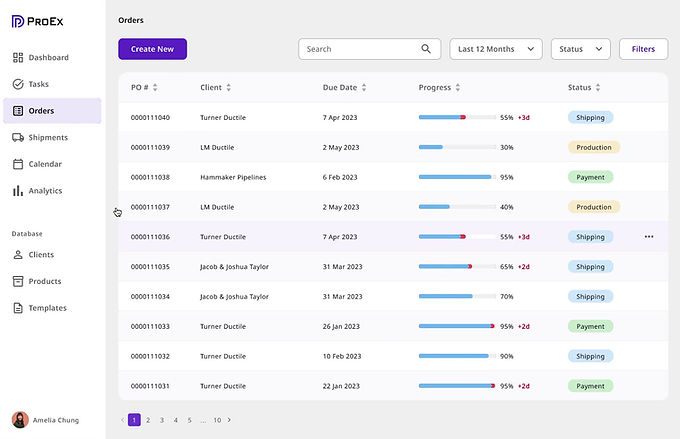
The dashboard uses data visualisation to give users a clear sense of both overall and individual project progress. Different colours are used to signify different status, whereas red is used to highlight items that require immediate action.


2. Powerful Database to Optimise Workflow
ProEx allows users to store information such as client contact and product details in its database. Once changes are made to an item, users can send the update to any document within a few clicks. This feature greatly increases workflow efficiency.

3. Single Platform, Separate Tracking
It is common for businesses to combine multiple orders into one shipment to save cost. In ProEx, orders and shipments are at once connected and separate: users create a shipment using data from related orders, but can still track their progress separately.
4. Automated Documentation
ProEx provides customisable document templates with pre-set formatting, and the content can be auto-filled with information from the database. In addition, the system automatically detects errors in the documents, allowing users to create standardised paperwork easily with less error, faster speed, and unified formatting.

Design System

Accessibility
Colour is a crucial indicator in ProEx. However, it’s difficult for colourblind users to recognise the different status these colours indicate. Thus I designed a colourblind-friendly mode that adds a pattern overlay to the solid colours, making it much easier for colourblind users to enjoy this tool.

Reflection
I am extremely grateful to the owners and employees of two Shanghai-based export companies for sharing their valuable insights and showing me their current workflow without reservation. The interviews, contextual inquiries, usability testing and informal discussions conducted at these two companies enabled me to gain a much deeper understanding of the pain points of manufacture and export SMEs. As a result, I was able to make use of in-depth qualitative research to inform a user-centred design.
ProEx is still at an incubation stage. Moving forward, I would like to fully flesh out the design beyond the MVP, and further develop the product into a comprehensive platform.